Adjusting overhang and tonearm height
Adjusting the overhang
- Temporarily remove the anti-skating weight.
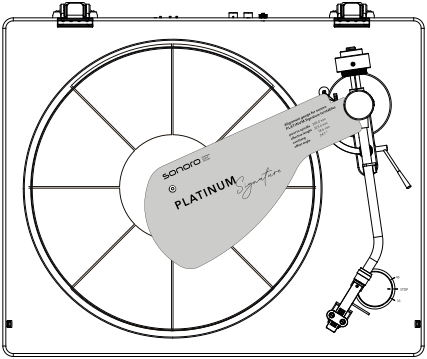
- Place the PLATINUM Signature alignment template between the spindle and tonearm, below the tonearm rest.
- Remove the stylus guard from the new cartridge and carefully lower the tonearm onto the alignment template.
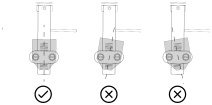
- Align the stylus exactly with the alignment mark. This is easiest to see from the left-hand side.
- When the stylus is aligned exactly, the overhang is correctly adjusted. Carefully tighten the cartridge screws. The white lines on the headshell can be used as a guide.
- Then adjust the tracking force.
Adjusting tonearm height and VTA
If the new cartridge has a different height, the VTA (Vertical Tracking Angle) must be readjusted. The aim is to position the stylus correctly in the record groove.
- Place a record, preferably an older one, on the platter and lower the tonearm.
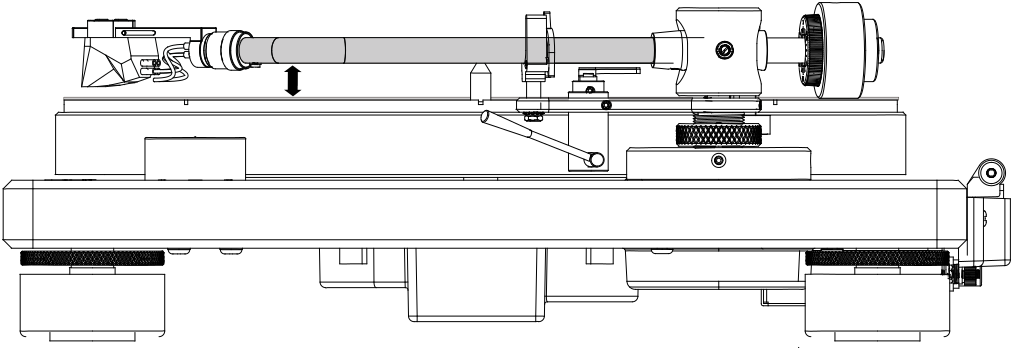
- Look at it from the side at the same level. The tonearm must be parallel to the record.
- If the tonearm is lower at the front, lower it at the rear pivot. If it is higher at the front, raise it at the rear pivot.
- The supplied spacer may also help. It is fitted between the cartridge and headshell.
Adjusting the height at the tonearm pivot
- Loosen the knurled screw at the tonearm pivot by turning it anticlockwise.
- Loosen the side screw with the hex key.
- Adjust the height so that the tonearm is parallel to the record when lowered onto it.
- Retighten the hex socket screw and secure the knurled screw at the tonearm pivot.
Note
The position of the knurled screw can be used as a reference when adjusting the tonearm height.
There is no adjustment screw in the rear hole of the tonearm base.
After this work, readjust the anti-skating force.