Replacing the cartridge
The PLATINUM Signature is supplied with an Ortofon 2M Red as standard.
Note
If you use a different cartridge, the overhang, tracking force, anti-skating and tonearm height may need adjustment. If in doubt, contact your specialist dealer.
For information on other Ortofon 2M cartridges, see Tracking force and anti-skating.
Removing and fitting the cartridge
- Leave the stylus guard fitted.
- Remove the headshell from the tonearm.
- Using a flat-blade screwdriver, first remove the mounting screws and washers, then remove the cartridge from the headshell.
- Initially screw the new cartridge onto the headshell only lightly so that it can still be moved.
- Refit the headshell to the tonearm. Fitting is described under Counterweight and headshell.
- Lightly tighten the screws with a flat-blade screwdriver, then adjust the Overhang.
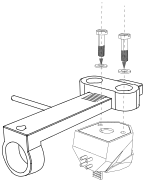
The illustration shows the screws, plastic washers, cartridge and contacts on the rear of the cartridge.
Connecting the headshell wires
| Signal | Wire colour |
|---|---|
| Left channel + (L+) | White |
| Left channel − / ground (LG) | Blue |
| Right channel + (R+) | Red |
| Right channel − / ground (RG) | Green |
Follow the new cartridge's instructions for fitting it and connecting the headshell wires. The Ortofon 2M colour coding is shown in the Ortofon fitting instructions.