Playing records
Note
Reduce the audio device's volume before playing a record. The loud crackling noise as the stylus enters the lead-in groove may damage the speakers or audio device. Wait until the cartridge is fully lowered before adjusting the volume.
- Even new records may crackle during playback. This noise is characteristic of records.
- Place only one record at a time on the platter.
- Close the dust cover for playback to prevent dust accumulation.
- Do not stop the platter rotating by hand during playback.
- Excessive volume may cause acoustic feedback. Reduce the amplifier volume and provide acoustic isolation.
Switching on the device
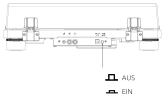
- Press the on/off button on the rear of the turntable to switch it on.
- Carefully open the dust cover.
Placing a record on the platter
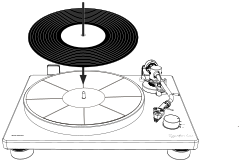
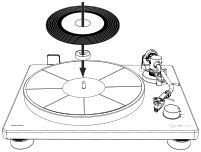
- Place the record on the platter mat. The spindle must pass through the record's centre hole.
- Use the supplied single adapter for singles.
Selecting the speed
The playback speed is normally printed on the record label. The turntable can be set to 33⅓ rpm or 45 rpm.
- Set the speed selector to the position appropriate for the record: 33 or 45.
- Release the tonearm clamp.
Starting playback
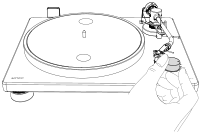
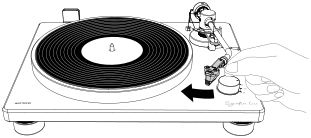
- Using your finger on the headshell, guide the tonearm over the edge of the record or to the track you want to start with.
- Use the tonearm lift to lower the tonearm slowly until the stylus touches the record and playback begins.
- Carefully close the dust cover.
Ending playback
Note
The PLATINUM Signature is a manual turntable. It has neither an automatic stop function nor automatic power management.
At the end of a record, always raise the tonearm manually using the tonearm lift to prevent damage to the stylus and record.
- Raise the tonearm lift.
- Using your finger on the headshell, move the tonearm back to its original position.
- Turn the speed selector to STOP. The platter stops and the device enters a low-power mode.
- Press the on/off button on the rear to switch off the turntable when it is no longer in use.
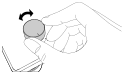
In the STOP position, the device is not completely disconnected from the power supply.