Setting tracking force and anti-skating
Setting tracking force
Prerequisite: The tonearm is balanced.
- Turn the counterweight ring until the centre line on the scale aligns with 0.
- Turn only the ring. The counterweight must not turn with it.
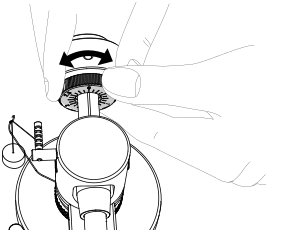
- Then turn the counterweight and scale together to set the appropriate tracking force for the cartridge.
- For the supplied Ortofon 2M Red, the recommended tracking force is 1.8 g.
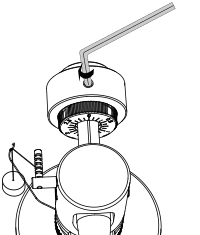
- Carefully secure the counterweight using the hex socket screw and supplied hex key.
Setting anti-skating force
The stylus must run in the centre of the record groove. This prevents audible distortion and uneven wear of the stylus and records.
- If the tonearm pushes too far outwards, the right channel becomes distorted.
- If it pulls too far inwards, the left channel becomes distorted.
Set the anti-skating force according to the tracking force and stylus profile.
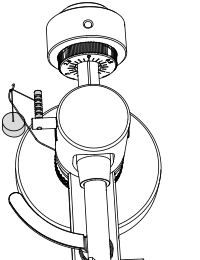
For the supplied Ortofon 2M Red, place the loop of the anti-skating weight in the second groove from the rear.
Other Ortofon 2M cartridges
| Cartridge | Setting |
|---|---|
| Ortofon 2M Blue | Second groove from the rear |
| Ortofon 2M Bronze | First groove from the rear plus additional anti-skating weight |
| Ortofon 2M Black | Third groove from the rear plus additional anti-skating weight |
Note
To adjust the anti-skating force for other cartridges, contact your specialist dealer or use a record with suitable test signals.