Connecting to a network
To use internet radio, streaming services, software updates and other network functions, connect the MEISTERSTÜCK 3 to a network.
Two options are available for quick setup: a wireless connection via WPS or a wired connection via LAN.
Connection via WPS
If your router supports WPS, you can connect the MEISTERSTÜCK 3 to your Wi-Fi network without entering the Wi-Fi password manually.
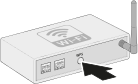
1. Press the WPS button on the router
Press the WPS button on your router to start the WPS function.
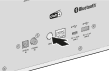
2. Press the WPS button on the MEISTERSTÜCK 3
Then press the WPS button on the rear of the MEISTERSTÜCK 3. The device automatically connects to your Wi-Fi network.
Connection via LAN
Alternatively, you can connect the MEISTERSTÜCK 3 directly to your router or network using a network cable.
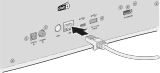
1. Connect the MEISTERSTÜCK 3
Connect the LAN connector on the rear of the MEISTERSTÜCK 3 using a network cable.
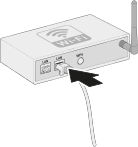
2. Connect the router
Connect the other end of the network cable to a free LAN port on your router or network switch. The network connection is then established automatically.
Other network setup options
In addition to WPS or LAN, you can set up and manage the network connection using the Network settings of the MEISTERSTÜCK 3.
There you can select available Wi-Fi networks and configure other network settings.
→ See chapter: Network settings