Connecting the power supply
Connect the sonoro STREAMER to the mains to put the device into operation.
Before connecting, read the information under General safety instructions.
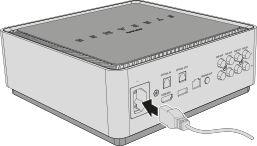
1. Connect the power cable
Connect the power cable to the power socket on the rear of the sonoro STREAMER.
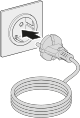
2. Connect to power
Then insert the mains plug into an easily accessible socket.
ℹ Use only a suitable AC power supply of 100–240 V AC, 50/60 Hz.
ℹ Make sure the power cable is not kinked, trapped or subjected to excessive strain.
ℹ The socket should be as close to the device as possible and freely accessible at all times, so that the device can be quickly disconnected from the mains if necessary.
ℹ Do not use overloaded multi-socket outlets and follow the power supply information in the General safety instructions.