Device front
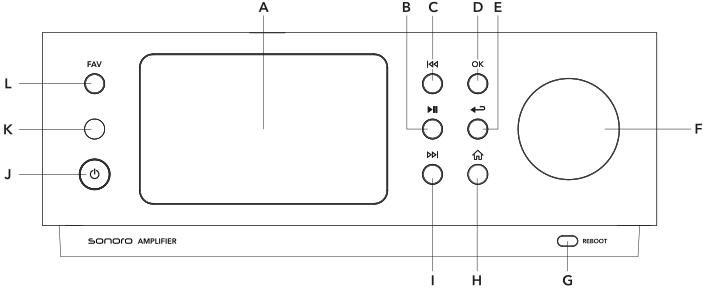
A Display
B Play / Pause button
C Previous track
D OK button
E Return to previous menu / submenu
F Rotary dial / volume control
G Reboot button
H Home menu
I Next track
J On / off switch
K Infrared receiver
L Favorites
The overview describes the main functions of the controls. Additional functions may be available depending on the selected source, active menu or current operating mode. The functions shown on the display are authoritative.
Restart
If the device does not respond as expected, it can be restarted using the Reboot button (G) on the lower right of the front panel.
The Reboot button restarts the device without deleting saved settings or favourites. Use this function only when the device is no longer operating correctly.