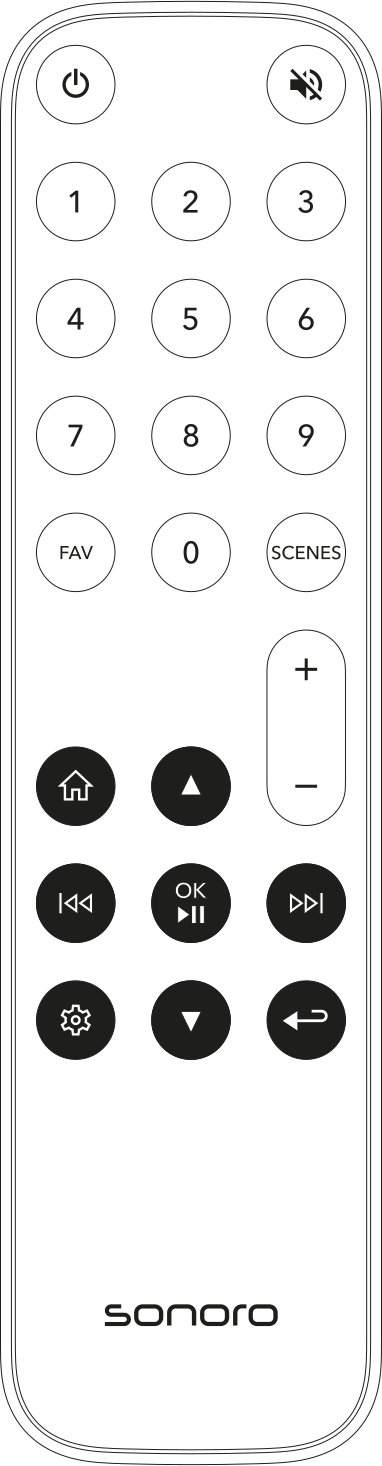
Using the remote control
You can use the remote control to navigate through menus, control sources and directly access key functions.

Up / down Press the Up or Down button to navigate up or down in the menu.
Left / right Press the Right button to go one level deeper in the menu. Press the Left button to go back one level.
While a source is playing, you can use the Left or Right button to switch to the previous or next track.
OK / Play/Pause When a menu is displayed, press the button to confirm the selection.
When a source is playing or an alarm has been triggered, press the button to start or pause playback, or to activate the snooze timer.
Back When a menu is displayed, press the Back button, to return to the previous menu.
When a source is playing, press the Back button, to open the source submenu.
Direct functions
Home Press the Home button to open the Home menu.

Settings Press the Settings button to open the settings menu directly.
ℹ Information on saving, opening, and directly selecting favorites using the remote control can be found in the chapter Favorites . ℹ Depending on the source or menu, individual buttons may have additional functions. The respective function is described in the corresponding chapters.