Recording to a computer via USB
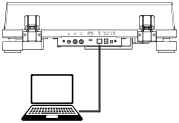
The contents of a record can be recorded digitally on a computer. Use the supplied cable to connect the turntable's USB-B output to a USB-A port on the computer.
Note
Set the PRE AMP switch to ON. The USB signals are for recording only, not for playing music from the computer through the turntable.
Do not disconnect the USB cable or put the turntable into standby during recording.
Preparing the computer
- The turntable uses the standard Windows or macOS drivers; no special driver is required.
- The computer recognises it as USB Audio CODEC.
- Install suitable audio recording software. The operating manual gives Audacity as an example; you can also use other recording software.
- If the software does not work as expected, contact your computer administrator.
Making a recording
- Connect the computer and turntable using the supplied USB cable.
- Set PRE AMP to ON.
- Select the appropriate speed and start playing the record as described under Playing records.
- Use your software to save the tracks on the computer.
For detailed instructions on using the software and transferring audio signals, refer to your recording software's manual.
Also note the automatic standby mode.
Recorded music is intended for private use only. Any other use requires the permission of the copyright holders.