Audio system and preamplifier
The fitted Ortofon 2M Red is an MM cartridge. Set your audio system or phono preamplifier to MM, not MC.
Video: You can find an additional video about the PLATINUM Automatic EAS under Document information – Watch the video.
The connected audio system or amplifier must be switched off and the volume set low.
Before switching on the audio system and turntable, make sure all connections have been made correctly and the correct preamplifier setting has been selected. Otherwise, loud humming may occur and damage the audio system or speakers.
Setting the preamplifier
Choose the appropriate connection type for your audio system. The PRE AMP switch is on the rear of the turntable.
With a PHONO MM input
PRE AMP → OFF
Connect the turntable to the PHONO MM input on your audio system. This bypasses the turntable's built-in preamplifier.
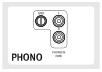
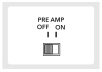
Without a PHONO input
PRE AMP → ON
Use an available AUX/line RCA input on your audio system. This uses the turntable's built-in preamplifier.
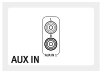
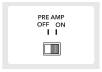
For playback via Bluetooth or USB recording on a computer, also set PRE AMP to ON.
Making the RCA connection
- Switch off the audio system and set the volume low.
- Use the supplied RCA cable to connect the turntable to the input you selected on the audio system.
- Connect the white plug to the left channel (L) and the red plug to the right channel (R).
- Before switching on the devices, check that PRE AMP is set to OFF or ON as appropriate for your input.
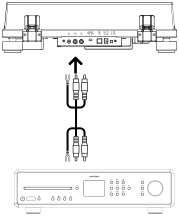
Connecting the ground wire
If your audio system has a built-in phono amplifier and a ground terminal, secure the ground wire to both devices.
- The ground terminal on the PLATINUM Automatic EAS is not a protective earth connection.
- Depending on the audio system, connecting the ground wire may cause humming. In this case, the ground wire does not need to be connected.
- We recommend connecting the PLATINUM Automatic EAS to the ground terminal of a MAESTRO Quantum.