Remote control
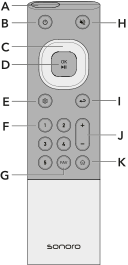
A Infrared sensor
B Standby button
D OK / Play / Pause button
E Settings
F Favorite buttons 1–5
G FAV button
H Mute button
I Back button
J Volume up / down
K Home button
Replacing the batteries
Replace the batteries if the remote control range decreases or operation is no longer possible.
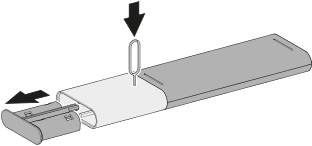
1. Open the battery compartment
Insert the supplied pin into the release opening on the back of the remote control and pull out the battery compartment.
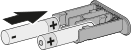
2. Insert the batteries
Insert two batteries of type AAA / LR03 according to the polarity shown into the battery compartment.
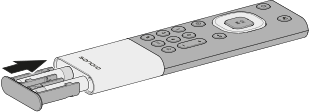
3. Close the battery compartment
Slide the battery compartment fully back into the remote control until it clicks securely into place.
Use two batteries of type AAA / LR03. Observe the correct polarity when inserting the batteries.
Do not cover the infrared sensor on the remote control or the infrared sensor on the device to ensure reliable signal transmission.