
Skip to content

Favorites

Favorites

Up to 99 local favorites are available. For example, radio stations, podcasts, playlists, albums, tracks, or input sources can be saved as favorites. Up to 20 favorites can be saved for Spotify.


Saving favorites on the device

To save a favorite directly on the device, the desired source must currently be selected or playing.

FAV button
Press and hold the FAV button until the favorites list is displayed.
Rotary control
Select an available preset.
OK button
Press the OK button to save the favorite.

Opening favorites on the device

FAV button
Briefly press the FAV button to open the favorites list.
Rotary control
Select the desired favorite.
OK button
Press the OK button to start the favorite.
Saved favorites can also be opened via Home → Favorites . However, this menu can only be used to open favorites, not to save them.

Saving favorites using the remote control

To save a favorite using the remote control, the desired source must currently be selected or playing.

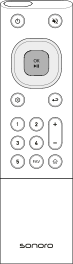
Remote control FAV button
Press and hold the FAV button until the favorites list is displayed.
Navigation buttons
Use the navigation buttons to select an available preset.
OK button
Press the OK button to save the favorite.

Opening favorites using the remote control

Remote control FAV button
Briefly press the FAV button to open the favorites list.
Navigation buttons
Use the navigation buttons to select the desired favorite.
OK button
Press the OK button to start the favorite.

Direct favorite selection using the remote control
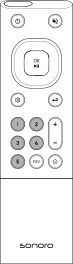
Remote control direct selection buttons

Presets 1–5

  • Press and hold the favorite button to save a favorite.
  • Briefly press the favorite button to open a favorite.
  • Playback starts automatically after a few seconds.

Presets 10–99

  • Briefly press the first digit and press and hold the second digit to save a favorite.
  • Briefly press both digits in sequence to open a favorite.


Types of favorites

Two types of favorites are supported: local favorites and source-specific favorites.

Local favorites are saved directly on the device and can be opened at any time. For example, individual podcast episodes, radio stations, playlists, albums, tracks, or inputs can be saved as local favorites.

In addition, certain sources such as Internet Radio and Podcasts support source-specific favorites. These favorites are managed within the respective source and can only be opened there.

For example, an entire podcast, including all available episodes, can be saved as a favorite within the Podcasts source. Internet radio stations can likewise be saved as favorites within the Internet Radio source.

To save an Internet radio station or podcast as a source-specific favorite, press and hold the Play/Pause button during playback. You can then find the saved entries in the Favorites menu of the respective source.
Local favorites remain permanently saved and are still available after a restart.
For Spotify, a maximum of 20 local favorites can be saved. To save local Spotify favorites, you must sign in on the device or via the sonoro audio App. After using Spotify Connect for the first time, local Spotify favorites can also be saved directly.
The sonoro audio App can also be used to copy locally configured favorites from one device to all other devices on the network.