Remote control
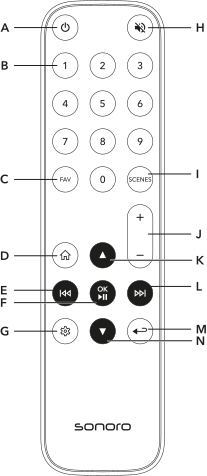
A On / Off button
B Direct selection buttons for favorites (0–9)
C Favorites button
D Home button
E Previous track / station
F Play / Pause and OK button
G Settings
H Mute button
I Scenes button
J Volume up / down button
K Up button
L Next track / station
M Back / submenu button
N Down button
Replacing the battery
Replace the battery if the remote control range decreases or operation is no longer possible.
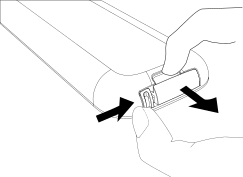
1. Open the battery compartment
Press the release tab and pull out the battery holder.
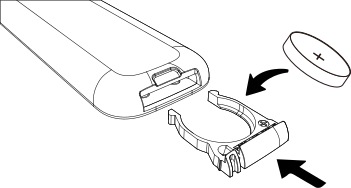
2. Insert the battery
Insert a battery of type CR2032 with the (+) marking facing upward and slide the battery holder fully back into the remote control.
Use only CR2032 batteries.
Do not cover the infrared sensor on the front of the device to ensure reliable signal transmission.