Operation on the device
The ATRON can be operated directly using the controls on the top of the device. The main controls are the volume and navigation knob and the OK, Back and Home buttons.
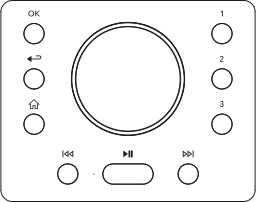
Volume and navigation dial

Use the rotary dial to navigate menus and adjust the volume during playback. - Turn the dial to select a menu item or setting. - Turn the dial during playback to increase or decrease the volume.
OK button

Use the OK button to confirm inputs and, depending on the current view, open further information. - Press the OK button to confirm a selection. - When a source is playing, pressing the OK button may display additional information about the source, station or music track.
Back button

Use the Back button to return to the previous view or exit a menu. - Press the Back button to return to the previous menu item. - During playback, the Back button may open a submenu or previous view, depending on the source.
Home button

Use the Home button to open the Home menu. - Press the Home button to open the central overview of sources and settings.
ℹ The exact function of individual buttons may vary slightly depending on the source, menu or playback situation. The respective functions are described on the relevant pages.