Bottom of the device
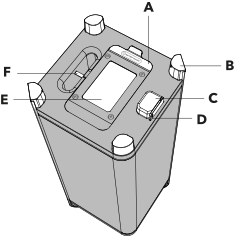
Details of the elements
A – Rubber flap
Battery on/off toggle switch: Before first use, set this to the “On” position to enable charging of the internal battery.
USB-C port: Exclusively for service and software updates. No audio playback!
Battery on/off toggle switch: Before first use, set this to the “On” position to enable charging of the internal battery.
USB-C port: Exclusively for service and software updates. No audio playback!
D – Rubber flap as drip protection
Protects the power connection from moisture and water ingress.
Protects the power connection from moisture and water ingress.
E – Battery
The battery compartment cover and the battery located inside the compartment.
The battery compartment cover and the battery located inside the compartment.