Function & Navigation
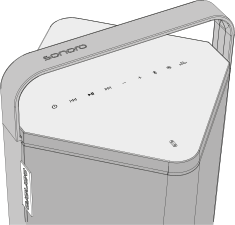
Controls and functions of the device.
An input is confirmed by a flashing signal from the status LED and the keypad.

Power on / off (Standby)
To switch the device on or off (standby)
- Short press – to turn on the device.
- Long press – to turn off the device (standby mode).


When switching on, the status LED flashes white. Once the startup process is complete, the status LED and the keypad light up continuously in white.

Back / rewind
In Bluetooth mode
To skip back to the previous track / rewind
-
Short press
- After a playback time of at least 3 seconds, playback jumps back to the beginning of the current track.
- If the button is pressed within the first 3 seconds of playback, playback jumps to the previous track.
-
Long press
- To rewind within the current track, if supported by the music player.
In Auracast mode
- In BMR mode, switch to the previous available Auracast transmission.

Play / Pause & lock keypad
- Short press – to start or pause playback.
- Long press (5 sec.) – to lock or unlock the keypad lock.

Next track / fast forward
In Bluetooth mode
-
Short press
To play the next track
- Long press – to fast forward within the current track.
In Auracast mode
- In BMR mode, switch to the next available Auracast transmission.


Volume
- To decrease / increase the volume.