Battery replacement
- Disconnect the sonoro VIBES L from the power supply by unplugging the power cable from the socket.
- Set the toggle switch on the underside of the device to OFF.
- Carefully place the device on a flat, clean, and stable surface so that the underside is easily accessible.
- Loosen the screws of the battery cover and remove the cover.
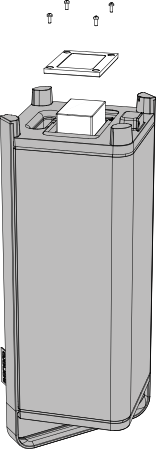
- Carefully remove the battery from the battery compartment.
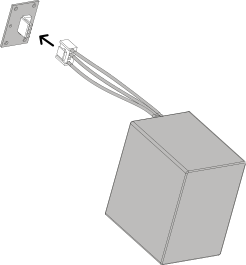
- Disconnect the cable harness connector from the internal connector. To do this, press the locking tab on the plug and carefully pull it out by hand.
-
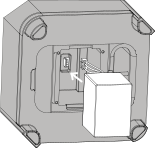
Connect the cable harness connector of the new battery to the internal connector.
- Make sure the plug is properly aligned.
- Do not apply excessive force – light pressure is sufficient.
- The plug fits only one way. Ensure that the polarity is correct.
- Insert the battery back into the compartment.
- Reattach the battery cover and secure it with the screws.
WARNING!
Only replace the battery with an original sonoro VIBES L replacement battery. The use of batteries of an unauthorized or incorrect type may lead to significant safety risks, including the risk of explosion and injury. Therefore, only use original spare parts approved by sonoro audio GmbH.